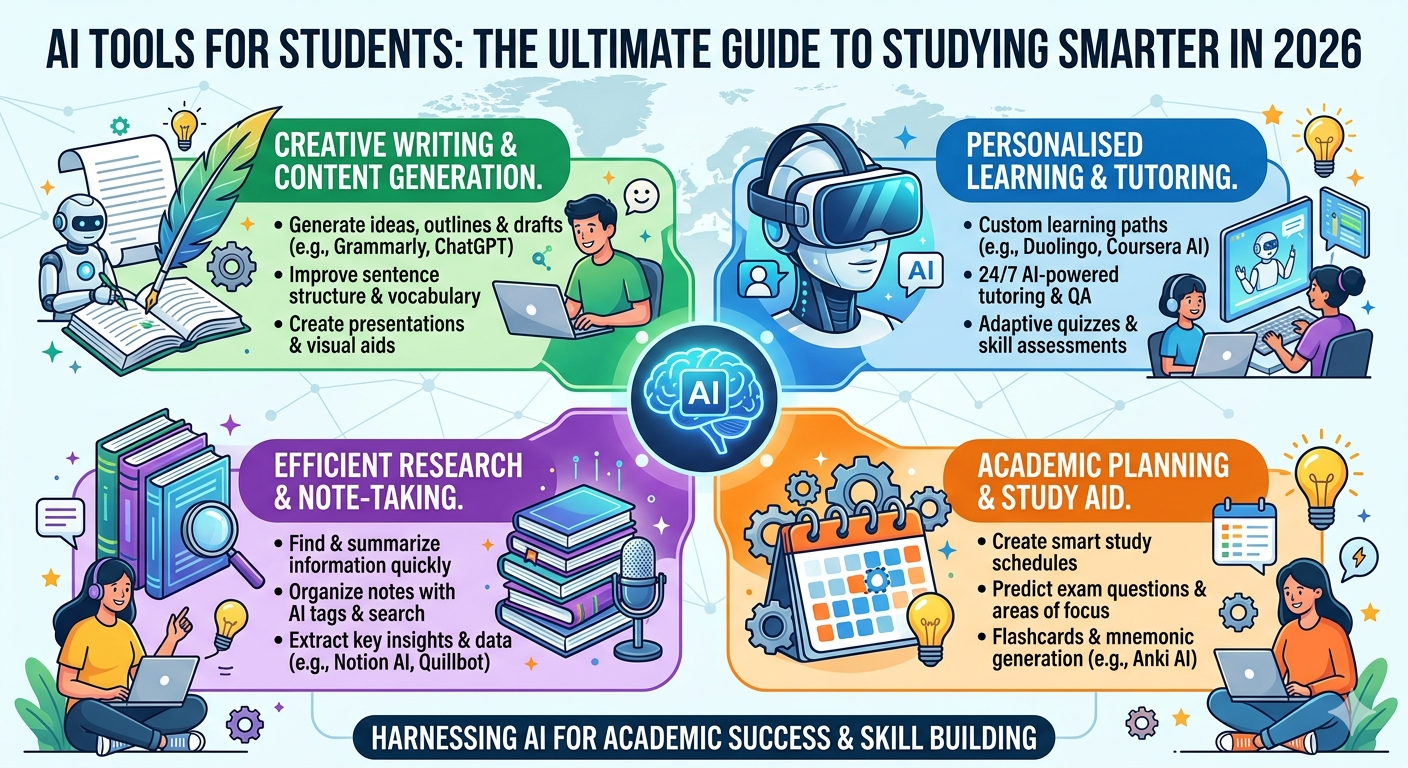
AI tools for students are increasingly beneficial for note-taking, research, writing, math, presentations, coding, productivity, and exam preparation. Indian students can now utilize free AI tools to learn tough topics, construct study plans, revision notes, and enhance assignments more quickly.
Students who are still deciding on their future path might look into the best career options after 12th before selecting the correct AI tools for their study.
Discover the best AI tools for students in 2026. From writing and research to math and presentations — explore free and paid tools that boost productivity and grades.
Table of Contents
Why AI Tools Are Useful for Students in 2026
In 2026, if you are a student and you are not utilizing AI tools for students, you are overworking yourself. That is not exaggeration; rather, it is the fact that artificial intelligence has fundamentally altered how people learn, conduct research, write, solve issues, and manage their time.
There has been a change in the world of education. AI literacy is increasingly widely discussed at universities as a fundamental skill. A growing number of employers include AI productivity tools familiarity in job descriptions. Additionally, the tools themselves, which were previously costly or exclusive to IT insiders, are now mostly free, available, and designed with academic use in mind.
The problem isn’t finding AI tools for students. It involves identifying the best ones, figuring out what each does well, and creating a workflow that speeds up, sharpens, and lessens the stress of your academic life. This guide is specifically meant to accomplish that.
The AI tools for students discussed in this blog will change the way you work, whether you’re a student getting ready for board exams, an undergraduate handling assignments, or a postgraduate handling research papers and deadlines.
What Makes an AI Tool Useful for Students?
Understanding what distinguishes a truly helpful AI tool for students from the noise is helpful before delving into the list. Although there are thousands of AI solutions on the market, the majority of students require tools that fit a particular set of requirements.
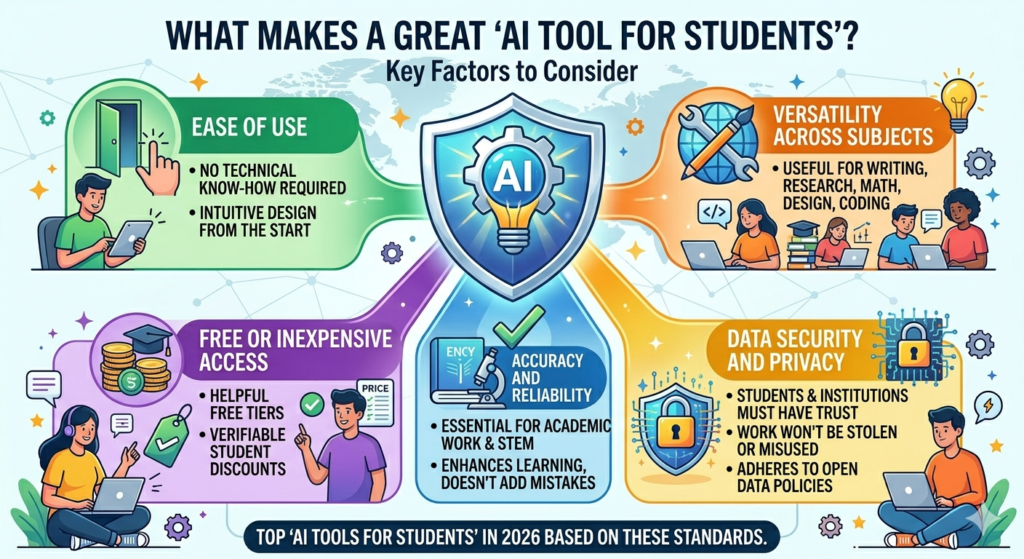
Ease of Use: Technical know-how shouldn’t be necessary for an effective AI tool for students. From the start, it ought to be intuitive.
Free or Inexpensive Access: Students have limited funds. The top tools either provide verifiable student discounts or have really helpful free tiers.
Accuracy and Reliability: Accuracy is a must for academic work, particularly in STEM fields. Instead of adding mistakes to your education, AI for learning should enhance it.
Versatility Across Subjects: Rather than fulfilling a single, specific purpose, the best tools may be used in a variety of fields, including writing, research, mathematics, design, and coding.
Data security and privacy: Students and academic institutions must have faith that their work won’t be stolen or used improperly. Reliable AI productivity tools adhere to open data policies.
These are the top AI tools for students in 2026 based on these standards.
Best AI Tools for Students in India
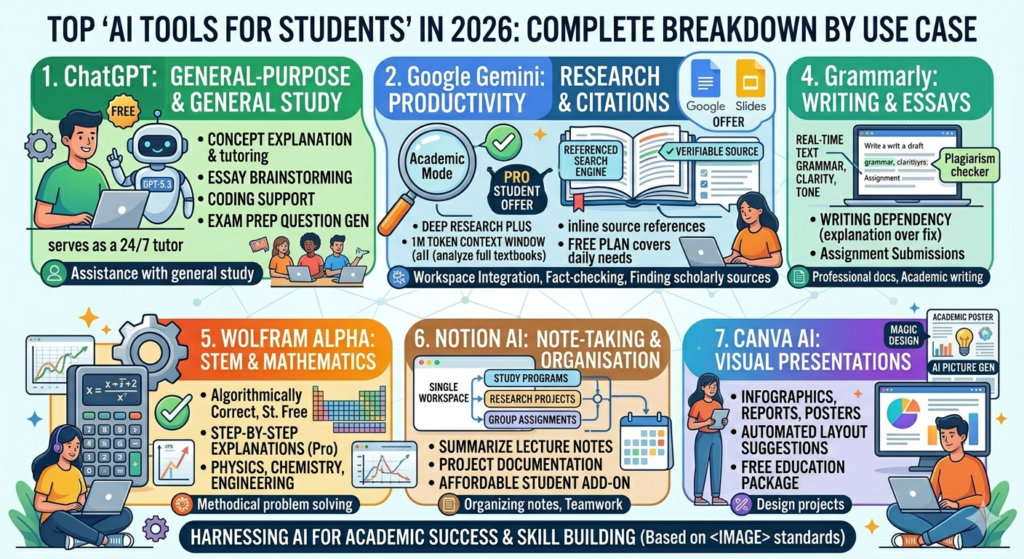
1. ChatGPT — Best General-Purpose AI Tool for Students
With good reason, ChatGPT continues to be the most popular AI tools for students in the world. The free tier, which is based on GPT-5.3 Instant as of 2026, offers data interpretation, image analysis, and file uploads. For the majority of homework requirements, the free plan is more than sufficient.
Exam preparation summaries, topic clarification, essay brainstorming, coding support, and practice question generation are all done by students using ChatGPT. One of the most underappreciated advantages of AI for learning in day-to-day student life is that it serves as a tutor that is always available and explains difficult subjects in simple terms.
Ideal for: Assistance with general study, explanation of concepts, draft writing, coding, and exam preparation.
Learn more about ChatGPT features on https://openai.com/chatgpt
For Example:
Ask ChatGPT: Explain photosynthesis like I am a Class 10 student, then give me 10 MCQs with answers.
2. Google Gemini — Best AI Productivity Tool with Student Offers
In 2026, Google Gemini has become one of the most potent AI tools for students due in large part to its exceptional student deal. Gemini AI Pro, which features Deep Research, NotebookLM Plus, a context window with one million tokens, and connectivity with Google Docs and Slides, is available for free to verified students for a maximum of 12 months. Verification via your institutional email takes less than five minutes.
A game-changing tool for AI for learning at the university level, Gemini’s large context window allows you to paste full textbook chapters and intelligently analyze them for research-heavy courses. Additionally, it is closely linked to Google Workspace, which the majority of students already use on a daily basis.
Ideal for: Presentations, Google Workspace integration, document analysis, and research.
Explore Google’s AI platform https://gemini.google.com
For Example:
Use Gemini to summarise a long topic, create study notes, or prepare a presentation outline.
3. Perplexity AI — Best Free AI Tool for Research and Citations
Among all the free AI tools accessible, perplexity AI is likely the most underutilized, which is a lost opportunity for students writing research papers. In contrast to ChatGPT or Gemini, Perplexity operates as a fully referenced search engine, providing inline source references for each response that may be examined, confirmed, and added to a bibliography.
The Academic mode is perfect for those studying science, law, medicine, and social sciences because it gives priority to peer-reviewed databases and academic publications. For individuals who require more advanced capability, the Education Pro plan offers a 50% student discount, while the free plan covers the majority of daily research needs. When it comes to AI tools for students, Perplexity is the most transparent since it reveals the source of its data.
Ideal for: Researching essays, collecting references, finding scholarly sources, and fact-checking.
Try AI-powered research with citations https://www.perplexity.ai
For Example:
Ask Perplexity: Find reliable sources about climate change impact in India and summarise the key points.
4. Grammarly — Best AI Writing Tool for Assignments and Essays
Grammarly is an essential component of any AI tools for students list. When it comes to enhancing writing quality, grammar, clarity, and tone, it continues to be the best AI writing tool. Grammar and spelling mistakes are detected by the free plan. In addition to offering significant student discounts, the Premium plan includes full-document tone analysis, plagiarism detection, and style recommendations.
Grammarly is a AI writing tool that is especially helpful for students, whose first language is not English. It does more than just fix mistakes; it explains why something is incorrect, which gradually improves writing ability rather than creating dependency. With it running in the background, every assignment, email, SOP, and report you write looks better.
Ideal for: Professional documents, academic writing, communication via email, and assignment submissions.
Improve writing skills with https://www.grammarly.com
For Example:
Paste your assignment introduction and check grammar, clarity, tone and sentence structure.
5. Wolfram Alpha — Best AI for Learning in STEM Subjects
Since Wolfram Alpha is the only program on this list that employs a computational engine instead of a language model, its scientific and mathematical solutions are algorithmically correct rather than statistically predicted. This distinction is quite important. ChatGPT and Gemini are capable of confidently providing incorrect solutions to challenging equations. Wolfram Alpha doesn’t.
Wolfram Alpha is the most dependable AI tools for students in STEM fields, including mathematics, physics, chemistry, engineering, and economics. The free plan provides definitive solutions for the majority of common problem types. The Pro student plan, which is offered at a 30% discount via student verification sites, includes comprehensive step-by-step explanations, which are crucial for understanding the process rather than just the solution.
Ideal for: Data interpretation, physics, chemistry, mathematics, and methodical problem solving.
Solve complex problems using https://www.wolframalpha.com
For Example:
Enter a maths equation or physics formula to understand the solution steps.
6. Notion AI — Best AI Productivity Tool for Note-Taking and Organisation
Notion AI incorporates intelligent automation into one of the most widely used student productivity solutions. Within a single workspace, students can utilize it to organize research across several projects, create structured study programs, summarize lecture notes, and draft project documentation.
Notion AI excels as a AI productivity tool for students handling numerous classes, group assignments, or research paper work. The majority of individual use cases are covered by the free plan. The AI add-on fits easily into an already-existing Notion workspace and is affordably priced for students.
Ideal for: Organizing notes, arranging studies, managing projects, and working in groups.
Organize notes with https://www.notion.so/product/ai
For Example:
Create a weekly study planner with subjects, deadlines, revision slots and exam dates.
7. Canva AI — Best Free AI Tool for Visual Presentations
The way students make reports, infographics, presentations, and posters is completely changed by Canva AI. Students with no prior design knowledge may create visually appealing academic content in minutes thanks to AI-powered design capabilities like Magic Design, AI picture generation, and automated layout suggestions.
Canva’s free tier is one of the most generous free AI tools available for creative work. Verified teachers and students can use all of the AI-powered features for free with the Education package. Canva AI is essential for design assignments, business presentations, social science projects, and humanities students.
Ideal for: Infographics, reports, academic posters, presentations, and design projects.
Create stunning designs using https://www.canva.com
For Example:
Use Canva to create class presentations, posters, reports and project visuals.
Free vs Paid AI Tools for Students
| Tool | Best For | Free Plan | Paid Option | Best Student Use |
|---|---|---|---|---|
| ChatGPT | Explanations, writing, coding, revision | Yes, with limits | Paid plans available | Study help, drafts, practice questions |
| Google Gemini | Research, notes, Google apps | Yes | Student/paid offers may vary | Notes, research, Docs/Slides help |
| Perplexity | Research with sources | Yes | Paid plan available | Finding sources and fact-checking |
| Grammarly | Grammar and writing clarity | Yes | Paid plans available | Essays, emails, assignments |
| Wolfram Alpha | Maths and science | Yes | Pro plan available | STEM calculations and explanations |
| Notion | Notes and planning | Yes | Education plan may be available | Study planner and project tracking |
| Canva | Presentations and design | Yes | Education/Campus options | Slides, posters, reports |
How Students Can Use AI Tools for Studying?
One of the most common misconceptions concerning AI tools for students is that costly subscriptions are necessary for effective use. In 2026, the free levels on all of these platforms actually provide thorough coverage for almost all academic tasks when paired wisely.
Here’s an affordable, useful student workflow:
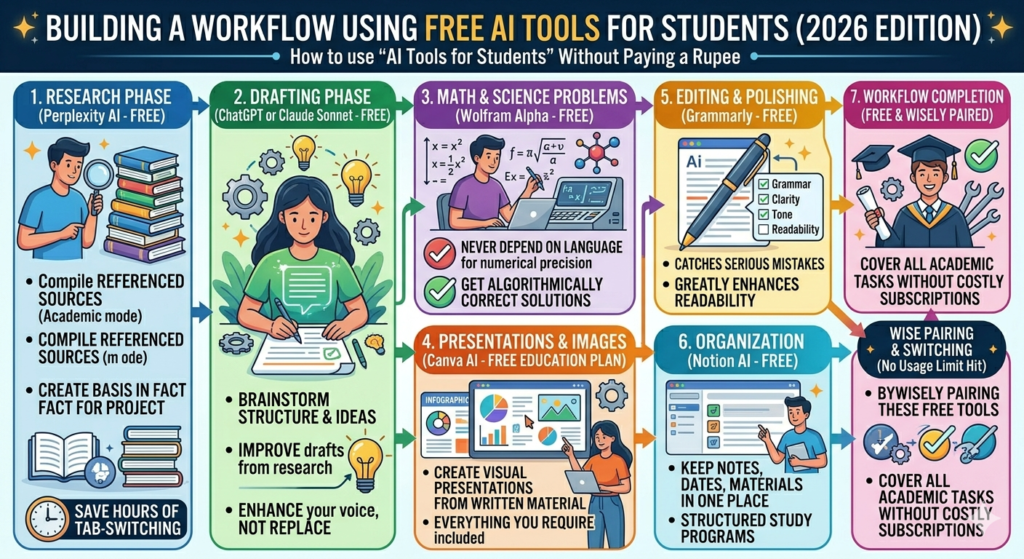
Research Phase: Create a basis in fact for your thesis or project by using Perplexity AI in Academic mode to compile referenced references. This takes the place of spending hours analyzing sources and switching tabs.
Drafting Phase: Write preliminary drafts, build on your research, and brainstorm structure using ChatGPT or Claude (which includes Sonnet 4.6 on its free tier). Use these AI writing tools to enhance your voice rather than to replace it.
Math and Science Problems: Use Wolfram Alpha as soon as you come across problems involving equations, integrals, statistics, or chemistry. For numerical precision, never depend on language models.
Editing and polishing: Before submitting any written work, run it using Grammarly. The most serious mistakes are caught by the free plan, which also greatly enhances readability.
Presentations and Images: Create visual presentations from your written material using Canva AI. Everything you require is provided under the free education plan.
Organization: Keep all of your notes, due dates, and project materials in one place by using Notion AI’s free plan.
By switching between free AI tools on a regular basis, you can cover every aspect of your academic workflow without ever reaching the usage limitations of any one platform.
Subject-Wise AI Tool Guide for Students
Different instruments are needed for different themes. Here is a brief explanation of how AI tools for students should be used, broken down by subject:
| Subject | Recommended AI Tools | How to Use Them |
| Mathematics & Physics | Wolfram Alpha, ChatGPT | Solve problems step-by-step; verify with Wolfram |
| English & Literature | Grammarly, ChatGPT, Claude | Draft essays, check grammar, analyse texts |
| Science & Research | Perplexity AI, Google Gemini | Gather cited sources, analyse documents |
| Computer Science | ChatGPT, GitHub Copilot | Code assistance, debugging, concept explanation |
| Business & Economics | Notion AI, Perplexity, Canva | Research, data analysis, presentations |
| Design & Media | Canva AI, ChatGPT | Visual creation, content scripting |
| Languages | Grammarly, ChatGPT | Grammar improvement, translation, writing practice |
How Students Should Use AI Tools Ethically?
AI tools for students should be utilized as learning tools, not as a way to avoid studying. Students can utilize AI technologies to learn difficult concepts, produce revision notes, generate practice problems, enhance grammar, plan presentations, organize study schedules, and assess their understanding prior to tests.
Students, however, should not directly copy and submit AI-generated answers as their own work. They should also avoid employing AI technologies to cheat on examinations, fabricate references, complete tasks without personal work, or break academic honesty requirements at their school or college.
AI tools are capable of making blunders as well. Important facts, calculations, dates, figures, references, and official material should always be verified through textbooks, teachers, official websites, or other reliable sources.
A simple rule is to use AI as a study aid, not as a substitute for your own learning.
Our NEET 2026 registration guide provides official exam-related information for students preparing for competitive tests.
Common Mistakes Students Should Avoid
Knowing which AI tools for students to utilize is only as important as knowing how to use them effectively. By repeated the same avoidable mistakes, many students miss out on the benefits of AI for learning.
Over-reliance on a single tool: There isn’t a single AI tool for students that works for everyone. For STEM calculations, for instance, using ChatGPT increases the likelihood of confidently incorrect results. Create a workflow with many tools.
Submitting AI-generated material without editing: AI writing tools are meant to support and enhance your work, not to take its place. Verbatim AI submission is prohibited by academic integrity regulations in the majority of institutions. Always start with AI and then rewrite with your own voice.
Ignoring accuracy verification: Free AI tools based on large language models are capable of fabricating references, fabricating facts, and misrepresenting numbers. Always use primary sources to confirm important information, especially for academic papers.
Not utilizing the student discounts that are available: For confirmed students, numerous AI productivity tools offer substantial discounts, often ranging from 50% to 100%. For the simple reason of not checking, many students pay the entire fee. Before subscribing, always look for student plans.
FAQs on AI Tools for Students
Q1. In 2026, which free AI technologies are the best for students?
Ans. The top free AI tools for students are Wolfram Alpha, Canva AI Education, Perplexity AI, Grammarly’s free plan, ChatGPT, Google Gemini (which provides up to 12 months free for verified students), and Notion AI.
Q2. Can students utilize AI tools safely for academic purposes?
Ans. Yes, if utilized appropriately. The top AI tools for students adhere to strict data protection regulations. Students should, however, constantly double-check information, credit original sources, and abide by the academic integrity guidelines set forth by their school.
Q3. What is the ideal AI writing tool for students?
Ans. The AI writing tool that is most frequently suggested for enhancing writing and grammar is Grammarly. Claude and ChatGPT are excellent options for writing and organizing more lengthy essays.
Q4. Can students use AI tools to improve their math skills?
Ans. Yes, but it’s important to use the correct tool. Wolfram Alpha is the most effective AI for learning in STEM since it solves problems with a computational engine rather than language prediction. It is more dependable in terms of numerical accuracy than ChatGPT.
Q5. Can AI productivity tools take the place of studying?
Ans. No, AI productivity tools are meant to improve learning effectiveness rather than to take the role of learning. They assist students with learning more effectively, organizing their time more effectively, and producing better work, but true comprehension still necessitates active engagement with the material.
Final Thoughts: Make AI Tools for Students Work for You in 2026
When it comes to AI tools for students in 2026, the most crucial thing to realize is that entry barriers have never been lower. The greatest tools may change every aspect of your academic life, from the first line of a research outline to the last revision of an assignment that has been turned in. They are also free and available on any device.
All students will succeed in the next years, not just those who have access to AI tools for students. They are the ones who understand how to combine these tools wisely, employ them strategically, and remain conscious of their limitations. Create your rotation stack. Discover the functions of the various free AI tools. Instead of silencing your voice, use AI writing tools to improve it. Instead of avoiding understanding entirely, use AI for learning to gain a deeper understanding.
The resources are available. The information is free. You can take advantage of this.
If you’re planning your future, don’t miss our complete guide on study abroad after 12th to make the right decision.
Pantivora assists Indian students with study materials, career advice, entrance tests, and study abroad preparation. More information can be found on the About Pantivora page, and errors, feedback, and topic suggestions can be sent to contact Pantivora.